Desiome vs Virtual Staging AI: which tool should you pick in 2026?
Disclosure: This comparison is published by Desiome. We've aimed for a fair, data-driven analysis, but readers should know our perspective.
If you're comparing Desiome vs Virtual Staging AI, you're probably a real estate agent or photographer trying to figure out which one gives you better results for less money. Both use AI to stage empty rooms, remove furniture, and produce listing-ready photos. But they take different approaches to pricing and features, and those differences actually matter depending on how you work.
I tested both tools to put this virtual staging AI comparison together. Below you'll find a feature breakdown, pricing tables, image quality samples, and a recommendation based on how you stage listings.
I generated around 50 images with both tools before writing this comparison. In this article, I share my observations on how each tool handles staging empty rooms, removing furniture (decluttering), pricing, and overall maintaining the realness of the space.
TL;DR
- Virtual Staging AI wins on processing speed (20s seconds) and multi-view staging that keeps furniture consistent across camera angles.
- Desiome wins on pricing (cheaper at every volume tier, scales to 1,000 images/month), pay-as-you-go flexibility, and bundled photo editing (sky replacement, lighting enhancement, post-render editing). Slightly slower processing time compared to Virtual Staging AI (2 minutes compared to 20s seconds).
- Price range: Desiome starts at $1/photo with no commitment. Virtual Staging AI starts at $25/month for 6 photos ($4.17/photo).
- Bottom line: Desiome, from the perspective of price and features for most users. Virtual Staging AI makes sense if processing speed or multi-view staging is your priority.
What each tool does
Desiome
Desiome is an AI platform for virtual staging, furniture removal (decluttering), sky replacement, and interior lighting enhancement. It works on desktop and mobile, which is handy if you're at a property and want to stage photos before you leave. Design styles include Standard, Modern, Scandinavian, Mid-century, Industrial, Luxury, Coastal, and Farmhouse.
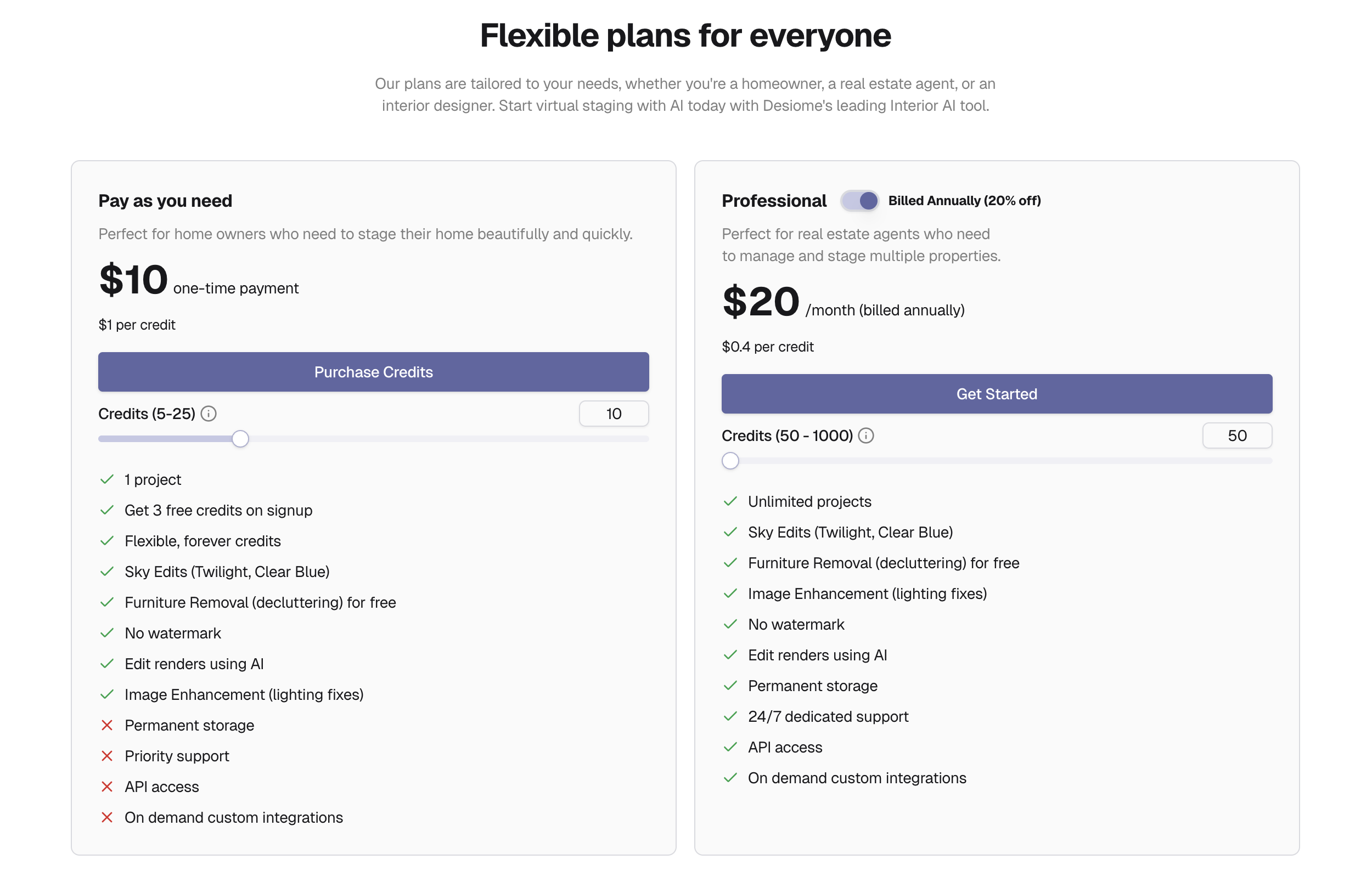
Pricing runs on a credit system. You get 3 free credits on signup. After that, you either buy credits at $1 each with no subscription, or subscribe from $20/month (~$0.50/credit monthly, ~$0.40/credit yearly).
Virtual Staging AI
Virtual Staging AI was developed at Harvard Innovation Lab and focuses on AI staging. Its main differentiator is multi-view staging, which keeps furniture layouts consistent when you photograph the same room from different angles. Design styles include Standard, Modern, Scandinavian, Mid-century, Industrial, Luxury, Coastal, and Farmhouse.
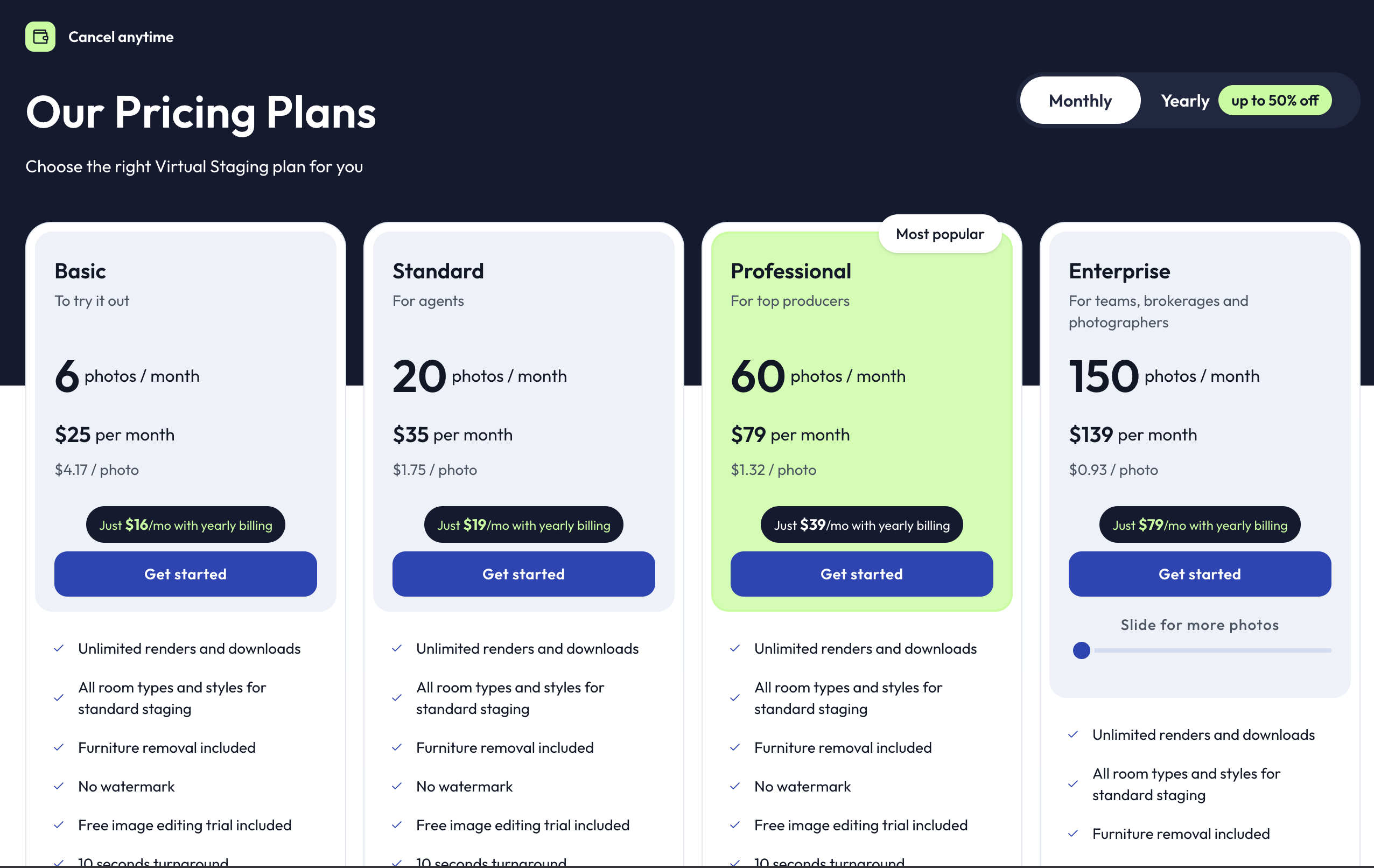
Pricing uses a monthly photo allotment. Plans range from $25/month for 6 photos to $139/month for 150 photos. They claim 20-second processing times. Their landing page shows a free demo, but uploading your own photos requires a paid plan. Sky replacement is not offered at any tier, so we were not able to test that feature.
Desiome vs Virtual Staging AI: feature comparison
Here's what you get with each tool.
| Feature | Desiome | Virtual Staging AI |
|---|---|---|
| AI virtual staging | Yes | Yes |
| Furniture removal | Yes (free on all plans) | Yes (all plans) |
| Sky replacement | Yes (free on all plans) | Yes (only paid plans) |
| Lighting enhancement | Yes (free on all plans) | Yes (only paid plans) |
| Multi-view staging | No | Yes (bedrooms, living rooms) |
| Mobile compatible | Yes | Web-based |
| API access | All plans | Enterprise only ($139/mo) |
| Watermarks | None | None |
| Digital alteration disclosure | Optional | No |
| Processing time | under 2 minutes | 20s seconds claimed |
| Free trial | 3 real credits (no watermark, all features) | Landing page demo only (watermarked), only bedrooms and living rooms |
| Sky edits on free plan | Yes | No |
| Free decluttering | Yes | Yes |
| Lighting enhancement on free plan | Yes | No |
Worth knowing before you sign up: Virtual Staging AI advertises a free trial on their landing page, but once you create an account, you have to pay to upload your own photos. The landing page freem trial adds a watermark. Desiome gives you 3 real credits on signup — no watermark, no payment required — and those credits include sky replacement and lighting enhancement, not just staging.
If you're a photographer who regularly needs both staging, sky edits, and photo enhancement, Desiome puts those in one place. If your workflow is purely staging empty rooms, Virtual Staging AI covers that well. When you're looking for the best virtual staging software, these feature gaps will matter more than anything on either company's marketing page.
Pricing comparison: Desiome vs Virtual Staging AI
Pricing is usually what decides it. These two tools take very different approaches.
Desiome pricing:
| Plan | Cost | Per-credit cost | Description |
|---|---|---|---|
| Pay As You Need | Starts from $5 one-time | $1.00/credit | No subscription. Buy when you need. |
| Professional (monthly) | Starts from $20/month | ~$0.50/credit | Scalable up to 1,000 images/month. 24/7 support. |
| Professional (yearly) | Starts from ~$20/month | ~$0.40/credit | 20% off monthly pricing. Same scalability. |
Virtual Staging AI pricing:
| Plan | Monthly cost | Photos/month | Per-photo cost |
|---|---|---|---|
| Basic | $25/month | 6 | $4.17 |
| Standard | $35/month | 20 | $1.75 |
| Professional | $79/month | 60 | $1.32 |
| Enterprise | $139/month | 150 | $0.93 |
Source: Virtual Staging AI pricing page. Yearly commitment billing can drop costs up to 50%.
What the pricing means in practice
For low-volume users (under 10 photos/month), Desiome's pay-as-you-go model is cheaper. You spend $5, get 5 credits, use them whenever. No monthly commitment, no expiring allotment. Virtual Staging AI's cheapest plan is $25/month for just 6 photos, putting the per-image cost at $4.17.
For mid-volume users (20-50 photos/month), Desiome Professional at $20/month gives you credits at $0.50 each, or $0.40 on yearly billing. Virtual Staging AI's Standard plan at $35/month covers 20 photos at $1.75 each. At this volume, Desiome costs less than half per image and the subscription itself is cheaper.
For high-volume users (60+ photos/month), Desiome's Professional plan scales up to 1,000 images per month, keeping the per-image cost at $0.40-$0.50. Virtual Staging AI's Enterprise plan uses a tier-based pricing model, in which at 150 photos/month cost $139 ($0.93/image), but at 10000 photos/month ($4199) the cost drops to $0.42 per image (still expensive per image compared to Desiome).
Two structural differences stand out. First, Desiome lets you buy credits without a subscription at all. Virtual Staging AI requires a monthly plan. If your staging volume swings month to month, that flexibility matters. Second, Desiome's per-image cost is lower than Virtual Staging AI's at every volume tier when you compare yearly pricing.
It goes without saying, that the savings compared to traditional staging costs are large at any tier.
Why staging matters: the data
Before getting into image quality, some context on what staging actually does for listings. According to the 2025 NAR Profile of Home Staging, 81% of buyers' agents said staging made it easier for buyers to visualize the property as a future home. Staged homes also sold faster in the majority of cases reported.
Both Desiome and Virtual Staging AI deliver staging at a fraction of physical staging costs. The question at this point is really just which tool handles it better for your situation.
Image quality: staging results compared
This is what matters most. Both tools promise photorealistic staging, but results vary by room type, style, and photo quality.
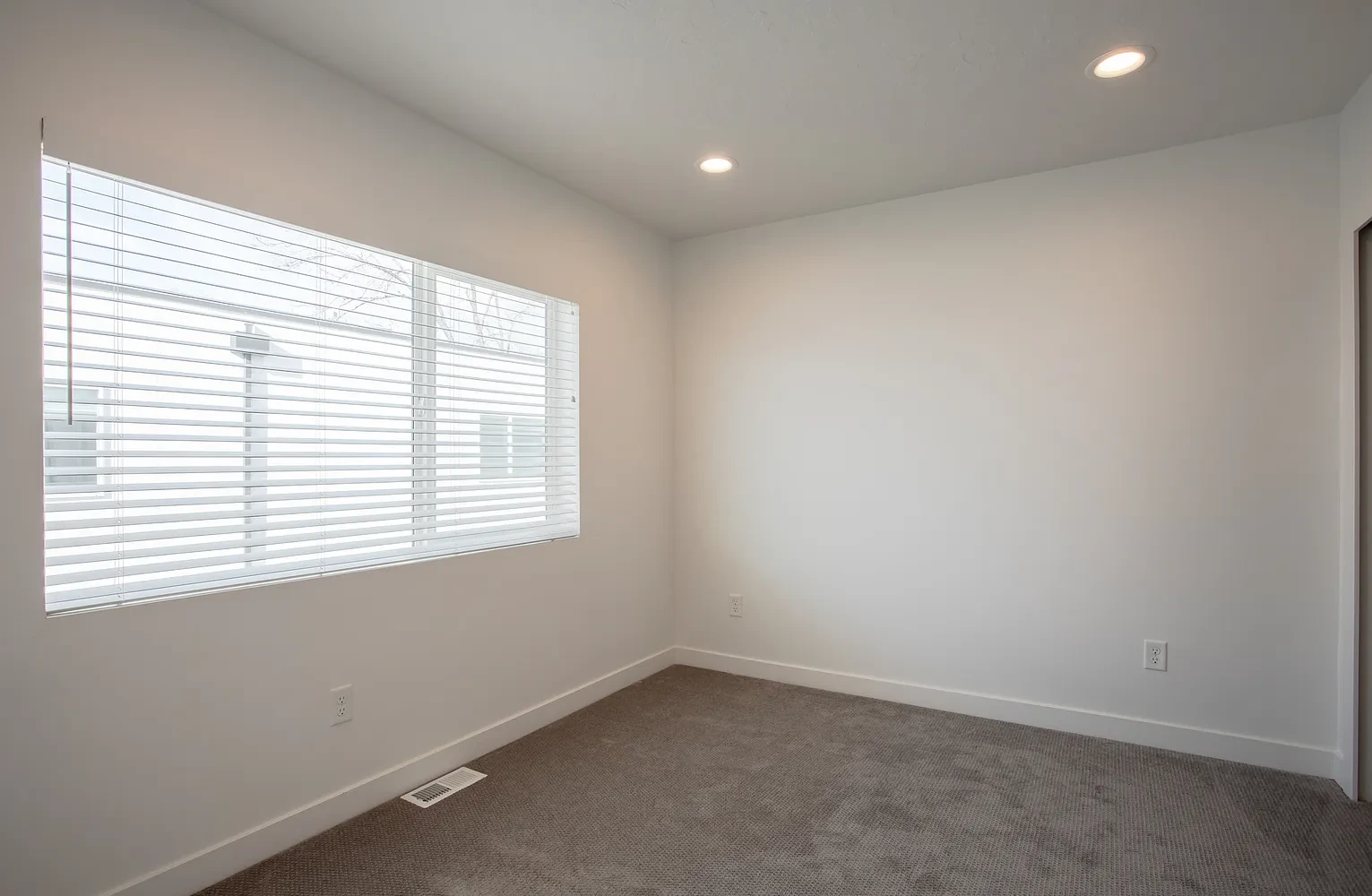
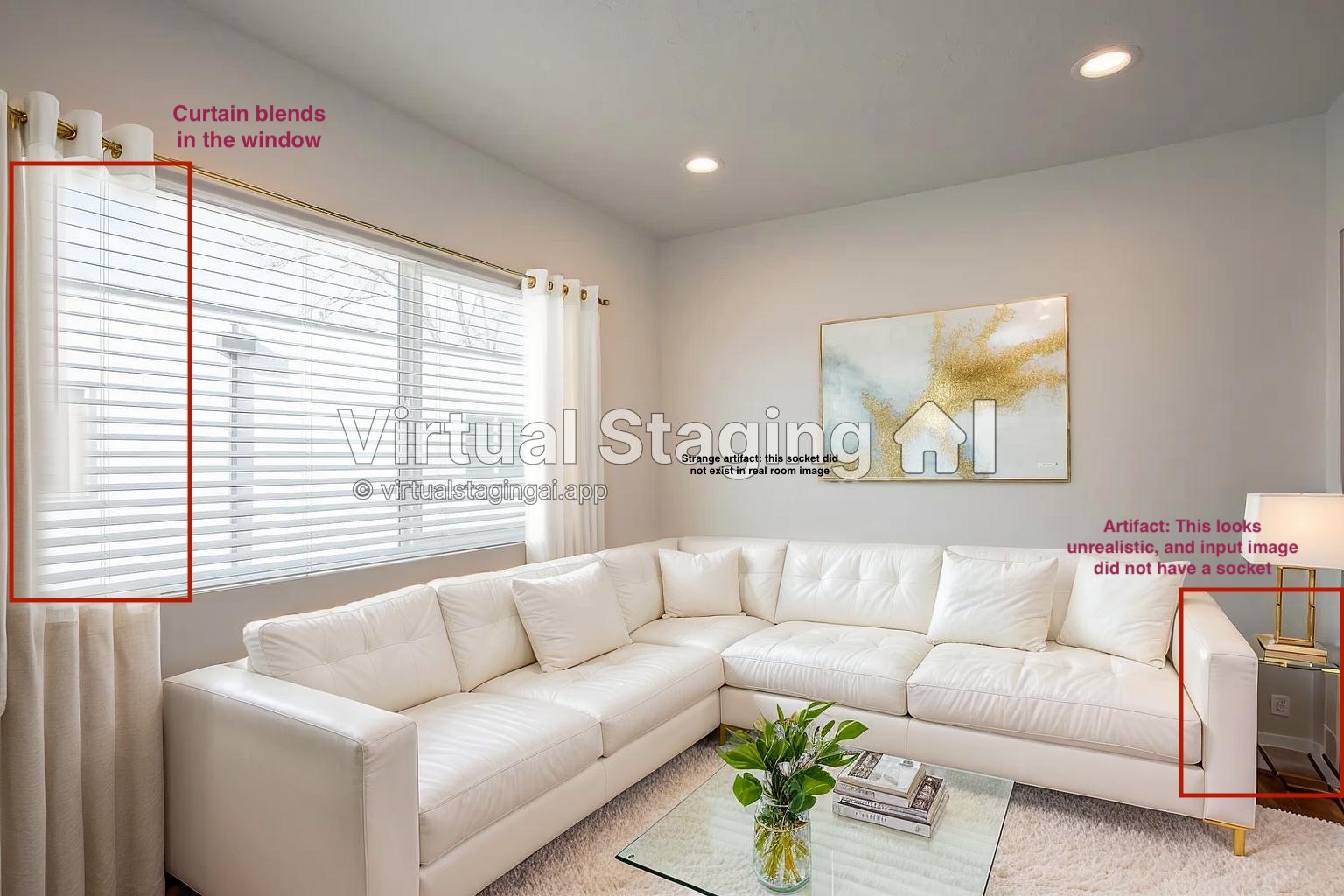
Virtual Staging AI output (Modern style)
The output does not change the room's layout. However, the curtains are blended within the window, clearly indicating this is AI generated. There is also an artifact in the bottom right corner that did not exist in the original input image. Finally, in my opinion, the sofa set is taking too much space and is too white. I could not edit and fix the curtains within the application.
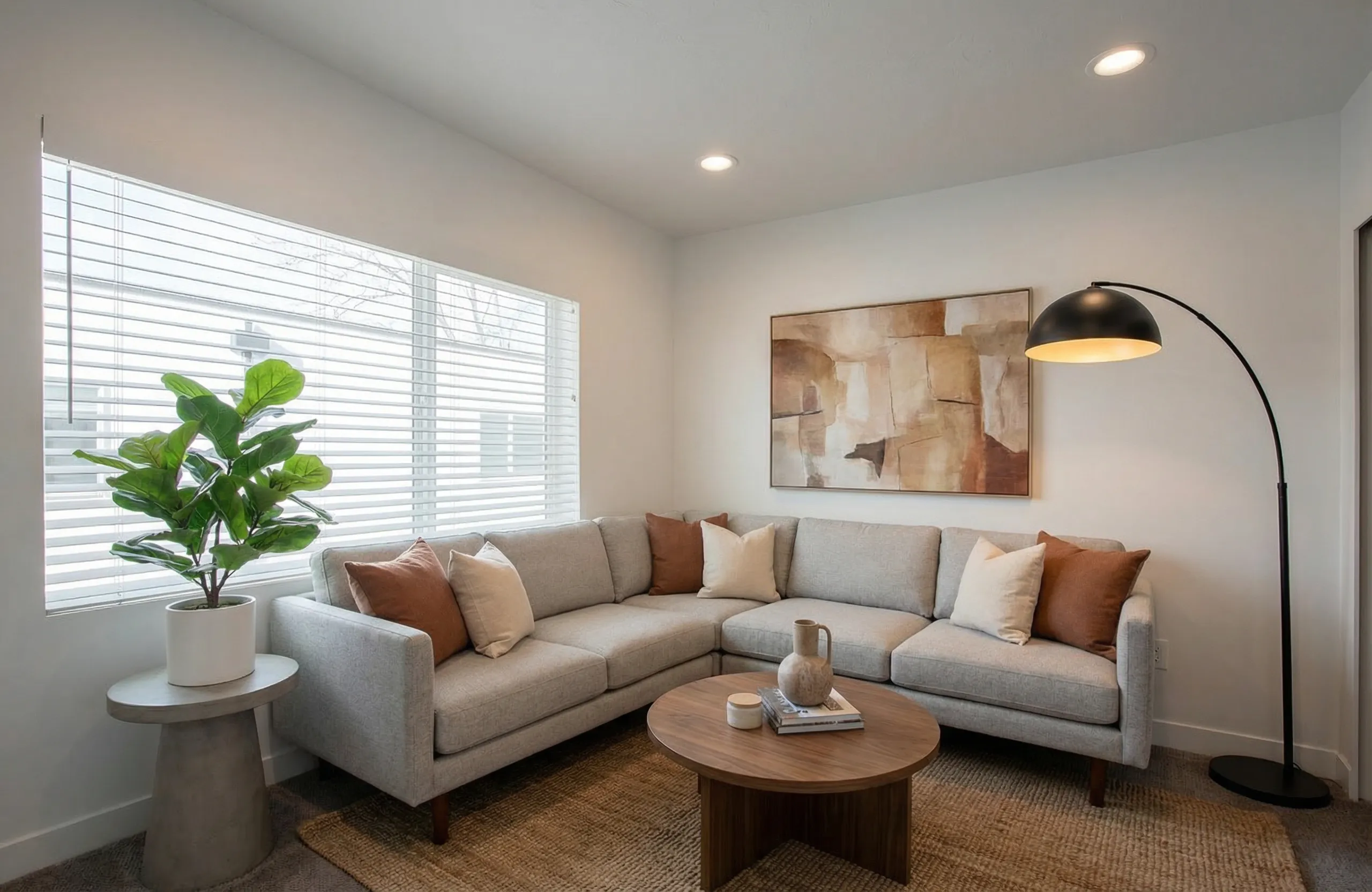
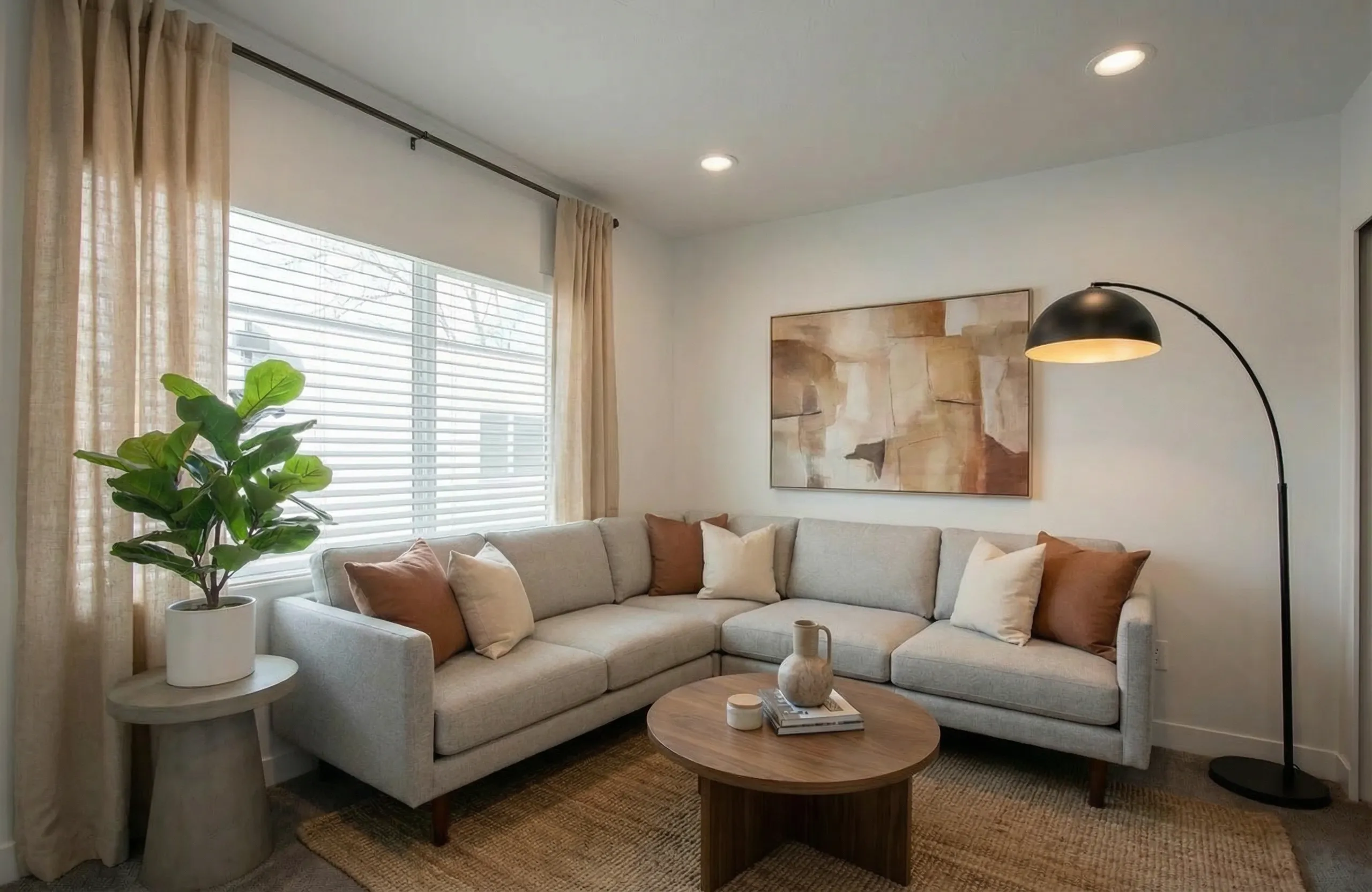
Desiome output (Modern style)
Although Desiome did not add any curtains to the window, the overall output looks comparatively harmonizing. The choice of colors for the sofa blend well with the room and the wall art. There are no obvious artifacts or issues in the output. If I am extremely critical, it feels like the sofa set is slighlty smaller in scale.
Unlike Virtual Staging AI, Desiome allows you to edit rendered images. I asked it to add curtains to the window and it did add it to the image naturally:
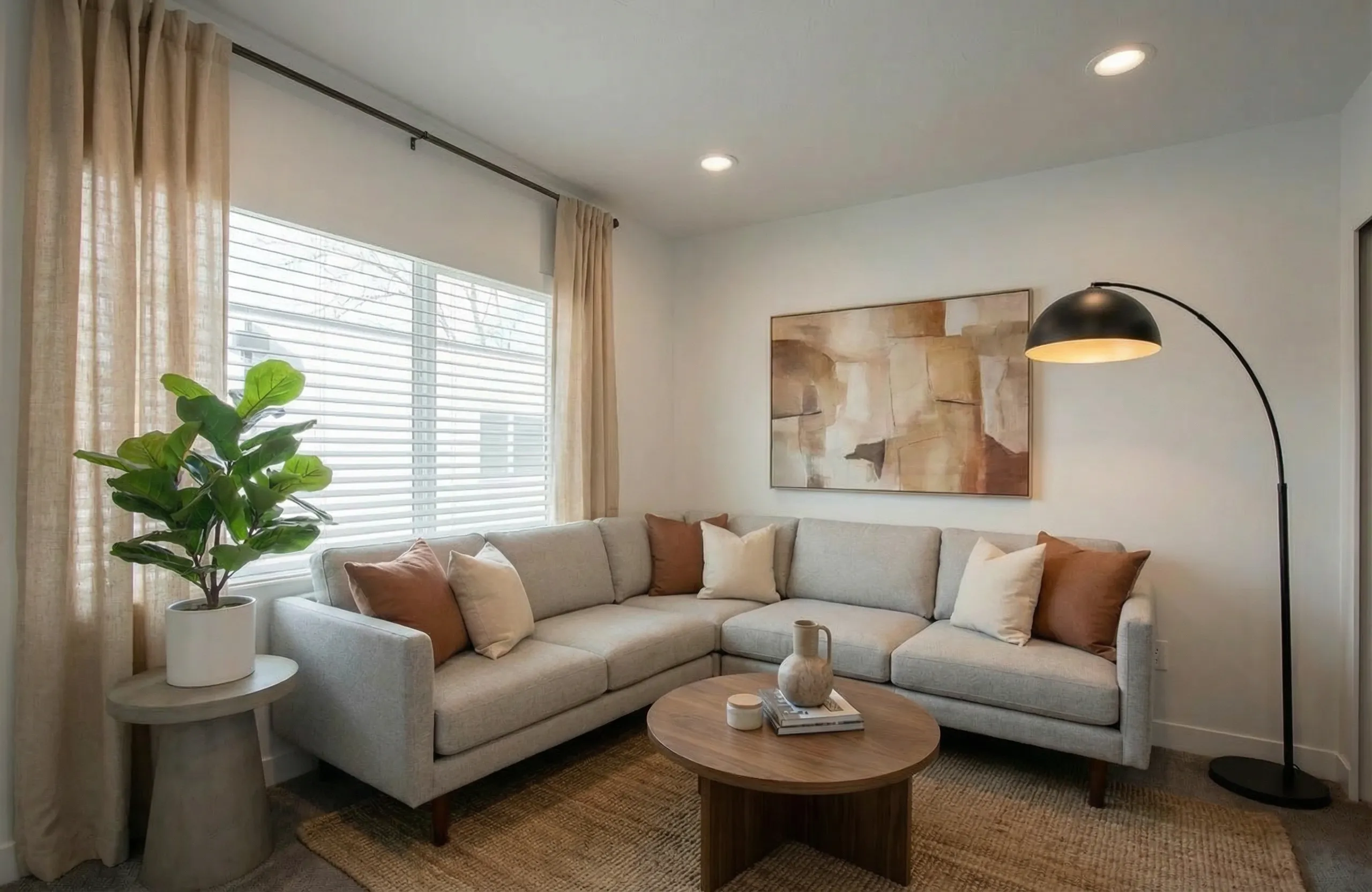
Desiome edited output (Modern style)
Summary:
| Tool | What worked | What stood out as an issue | Editing after render |
|---|---|---|---|
| Virtual Staging AI |
|
|
|
| Desiome |
|
|
|
In my experience with many images, Virtual Staging AI produced similar-looking furniture. Which means you might get a similar look across different listings. Desiome understood the room's color schemes better, and the output looks more harmonious. Both Desiome and Virtual Staging AI kept the room layout the same, which is very important to not deceive buyers.
From what I've seen, both tools produce results that work for MLS listings. The differences show up in edge cases: rooms with unusual angles, strong natural light, or architectural features like bay windows. If you're weighing these options, I'd use both free trials on the same set of photos so you can compare directly.
Decluttering: removing existing furniture
Both tools offer furniture removal (decluttering), but the results differ. If you're staging a room that already has furniture in it, you need the AI to strip the room clean before adding new pieces. Here's how each tool handled the same furnished room.
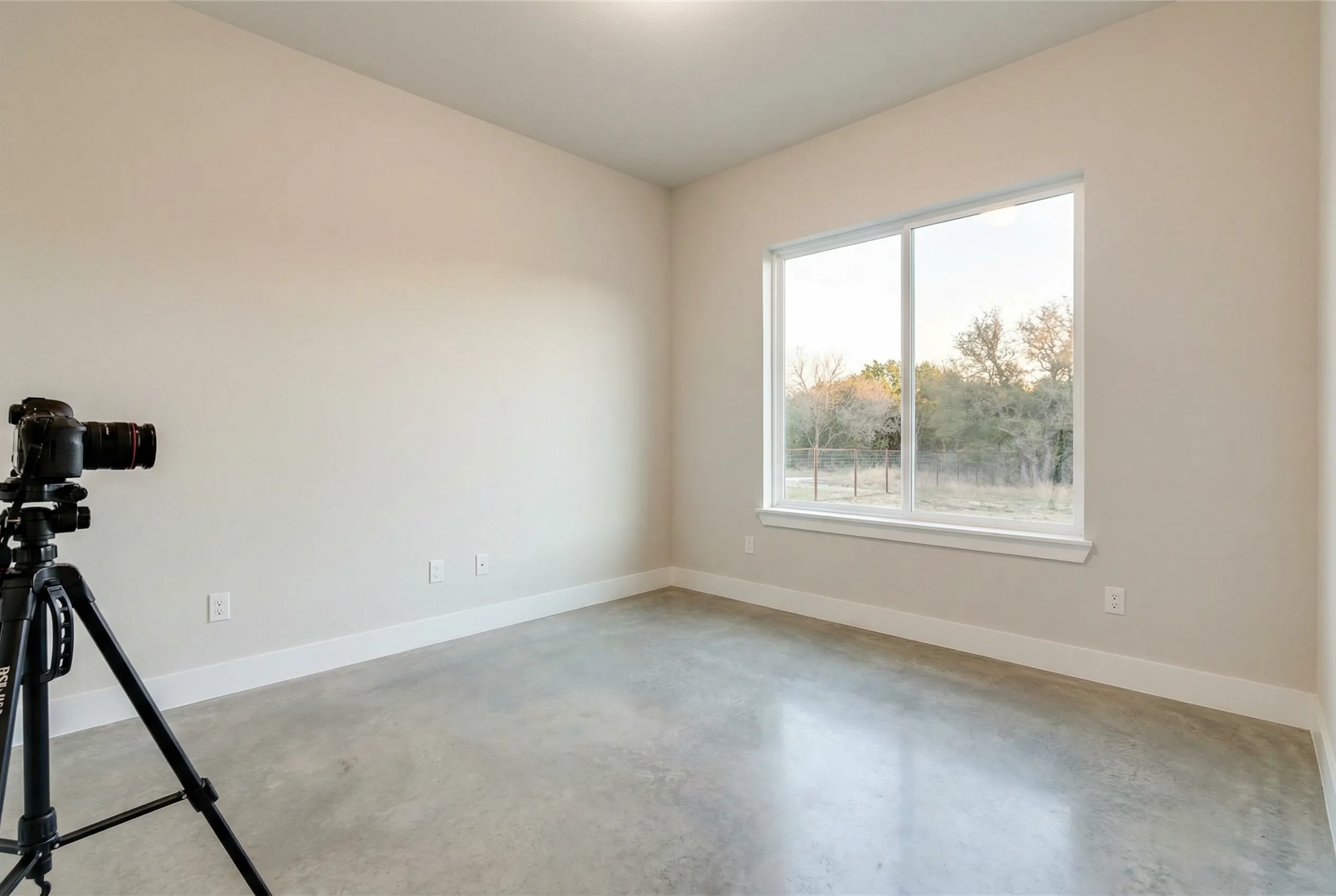
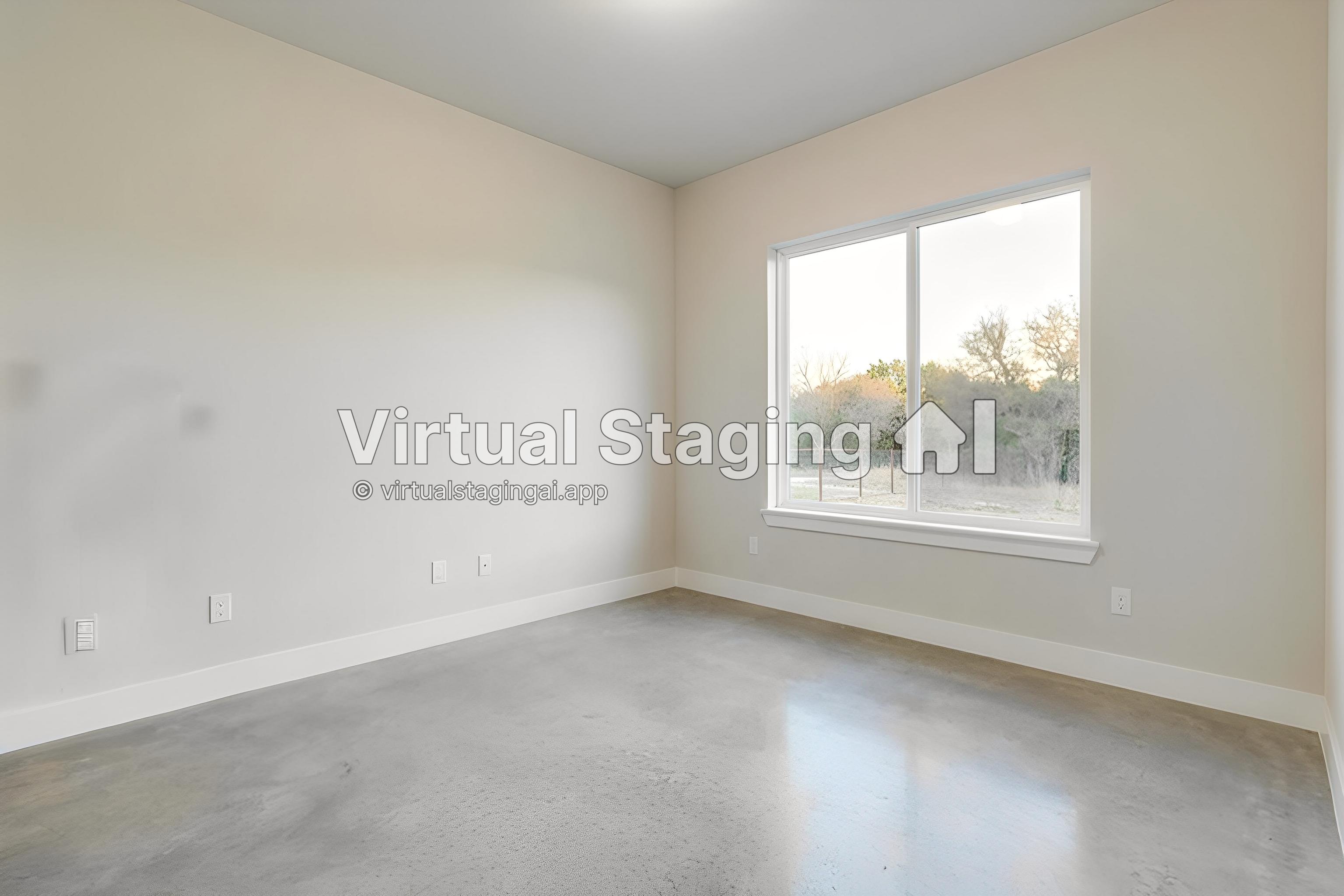
Virtual Staging AI decluttering result
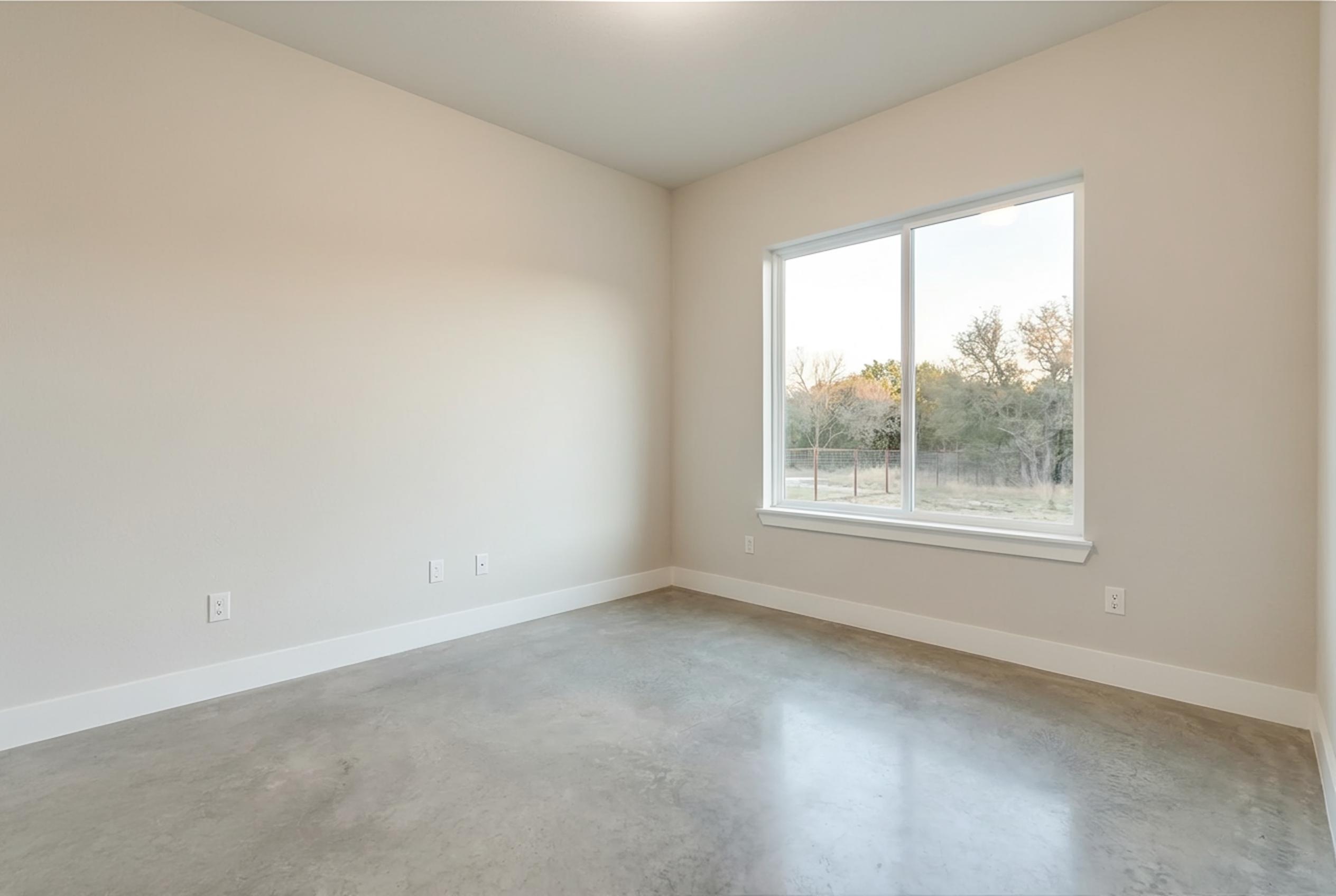
Desiome decluttering result
In this comparison, both tools effectively removed the object from the room. However, Virtual Staging AI generated an electrical outlet on the left wall that did not exist in the original image. There are also some minor black blurry patches on the wall, which show as if the wall paint is dirty.
Decluttering quality matters because it's the foundation for staging. If the AI leaves artifacts or blurred patches where furniture used to be, the staged result will look off no matter how good the new furniture placement is.
For a broader look at how AI staging tools stack up, check our comparison of top virtual staging tools.
Where Desiome works best
Low-volume and pay-per-use workflows. Homeowners selling a single property or part-time agents can buy credits at $1 each with no subscription. The 3 free credits let you test without spending anything.
High-volume teams and brokerages. Desiome's Professional plan scales up to 1,000 images per month at $0.40/image on yearly billing. That's cheaper per image than Virtual Staging AI at every tier, including their Enterprise plan ($0.53/image yearly). If your volume fluctuates, you can adjust your plan up or down rather than being locked into a fixed photo allotment.
Photographers who need editing beyond staging. Desiome's sky replacement and lighting enhancement mean you can stage a room and fix the exterior shot in the same tool. That's one fewer login in your workflow.
Teams that need API access on a budget. API access is available on all Desiome plans, including pay-as-you-go. Virtual Staging AI locks API access behind the $139/month Enterprise tier.
Mobile-first users. If you shoot and stage from your phone at properties, Desiome's mobile support is a practical advantage. For a full walkthrough of how AI staging fits into your listing workflow, see our guide to virtual staging for real estate.
Where Virtual Staging AI works best
High-volume agents who prioritize speed. Virtual Staging AI's 20s second processing is faster than Desiome. If you're uploading large batches against tight deadlines, that throughput matters. The Enterprise plan ($139/month for 150 photos) also includes a dedicated success manager.
Multi-angle room staging. The multi-view staging feature solves a real problem. When you stage a bedroom from two angles and the bed stays in the same spot in both photos, it looks more believable to buyers. In our limited testing, Virtual Staging AI only handled this correctly in rigid cases where the room layout was simple, and the two images had a large overlap.
Quick-turn listings. The 20s second processing claim, if accurate, makes it one of the faster options out there. For agents uploading listing photos against a deadline, that speed gap could matter.
No-commitment trials. Virtual Staging AI lets you try it without creating an account. That's a lower barrier than most competitors. If you're evaluating every virtual staging AI alternative on the market, this low-friction trial is a good starting point.
The tradeoffs you should know about
Neither tool is perfect. Here are the honest gaps.
Desiome doesn't have multi-view staging. Processing speed isn't advertised, so it's unclear how it compares. The style library (6 options) is slightly smaller than Virtual Staging AI's 7 styles, though both cover the popular design directions.
Virtual Staging AI doesn't have sky replacement or lighting enhancement. API access requires the most expensive plan ($139/month). The Basic plan's per-photo cost ($4.17) is steep for what you get. And multi-view staging only works for bedrooms and living rooms right now.
Both tools share a limitation common to all virtual staging software: the staging only exists in photos. Buyers will walk into an empty room. Worth managing expectations around, regardless of which tool you use.
Which one should you pick?
Here's where I land after comparing Desiome vs Virtual Staging AI across features, pricing, and output quality.
Pick Desiome if you want pay-as-you-go flexibility, need photo editing beyond staging (sky replacement, lighting, post-render edits), require API access without paying enterprise prices, or want the lower per-image cost at any volume. The 3 free credits make it risk-free to try.
Pick Virtual Staging AI if processing speed is critical, you need multi-view consistency across room angles, or you prefer a no-signup trial before committing.
For most agents and teams, Desiome is the stronger pick on both price and features. Virtual Staging AI's edge is speed and multi-view staging — if neither of those is a priority for your workflow, the pricing math is hard to justify.
Honestly, though, the best thing you can do is use both free trials on the same property photos. If you're still figuring out what the best virtual staging AI looks like for your workflow, testing on your own listings will tell you more than this article can.
Although both tools have their strengths, my final recommendation is that it depends: if you want a tool the generates images in 10 seconds and keeps the original room layout, but that can have artifacts, unnatural shadows, then Virtual Staging AI might be better. Desiome works if you need more control over the output, natural shadows, but slightly slower (up to 2 minutes).
Read more
You might be interested in the following articles:
Top 5 Virtual Staging Software Tools in 2025
Discover the top 5 virtual staging software tools in 2025. Compare features, pros, cons, and pricing to find the right fit for your listings.
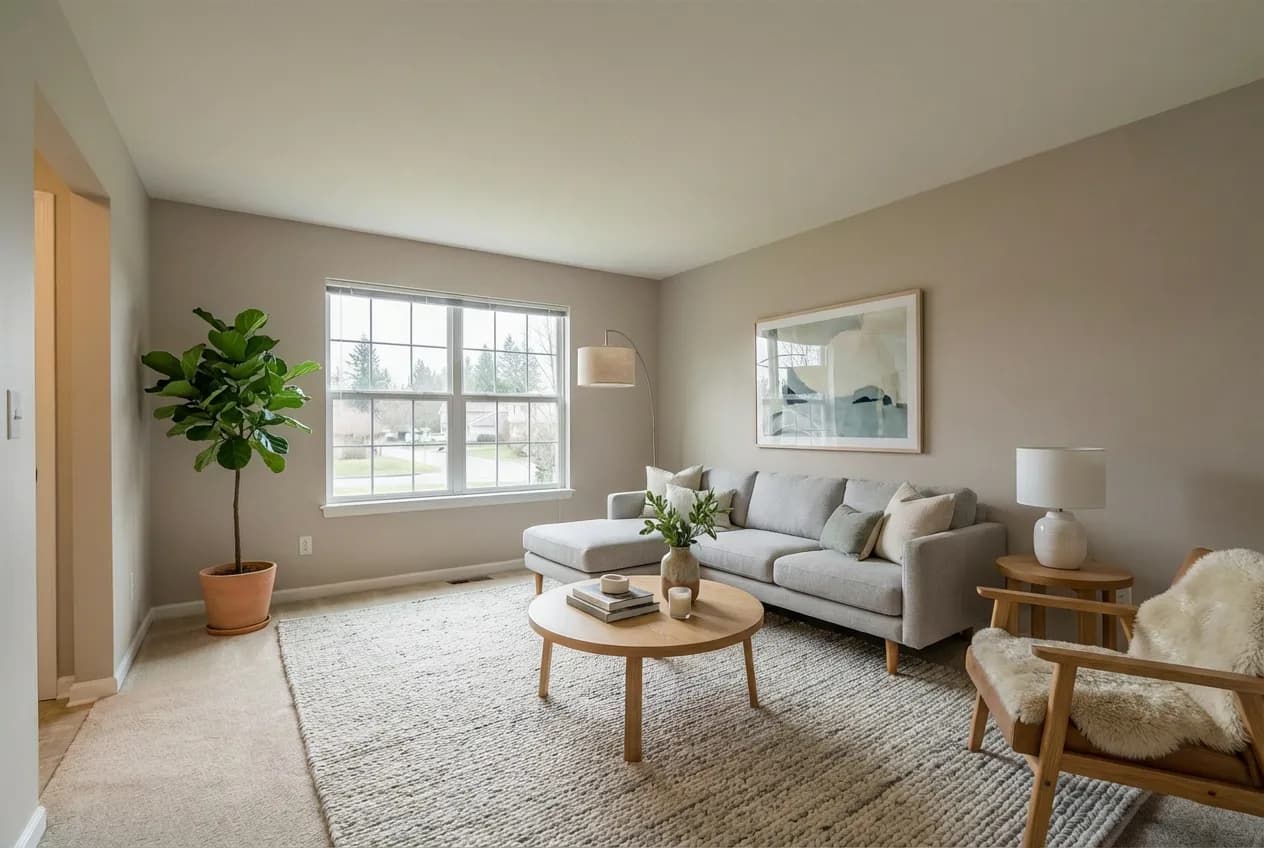
What is virtual staging? A guide for real estate
What is virtual staging in real estate? Learn how AI virtual staging works, when to use it, and how to create listing photos that feel lived in.

What Does Contingent Mean in Real Estate? (Realtor Guide)
What does contingent mean on a listing? Learn contingency types, why deals fall through, and how realtors can generate cleaner offers with fewer conditions.