What is virtual staging? A guide for real estate
Most empty listing photos underperform for a simple reason: buyers do not know how to read a blank room. They see four walls, a floor, and maybe some good natural light. They do not automatically picture a bed, a dining table, or a workable layout. That is where virtual staging earns its keep.
What is virtual staging? It is the process of digitally adding furniture, decor, and styling to property photos so a space feels lived in and easier to understand. In real estate, that matters because buyers make fast decisions from photos before they ever book a showing.
AI virtual staging takes the same basic idea and makes it more practical for everyday use. Instead of sending one image to a designer and waiting a day or two, you can upload a room photo, generate staged versions quickly, compare styles, and publish stronger marketing images without the cost of physical staging.
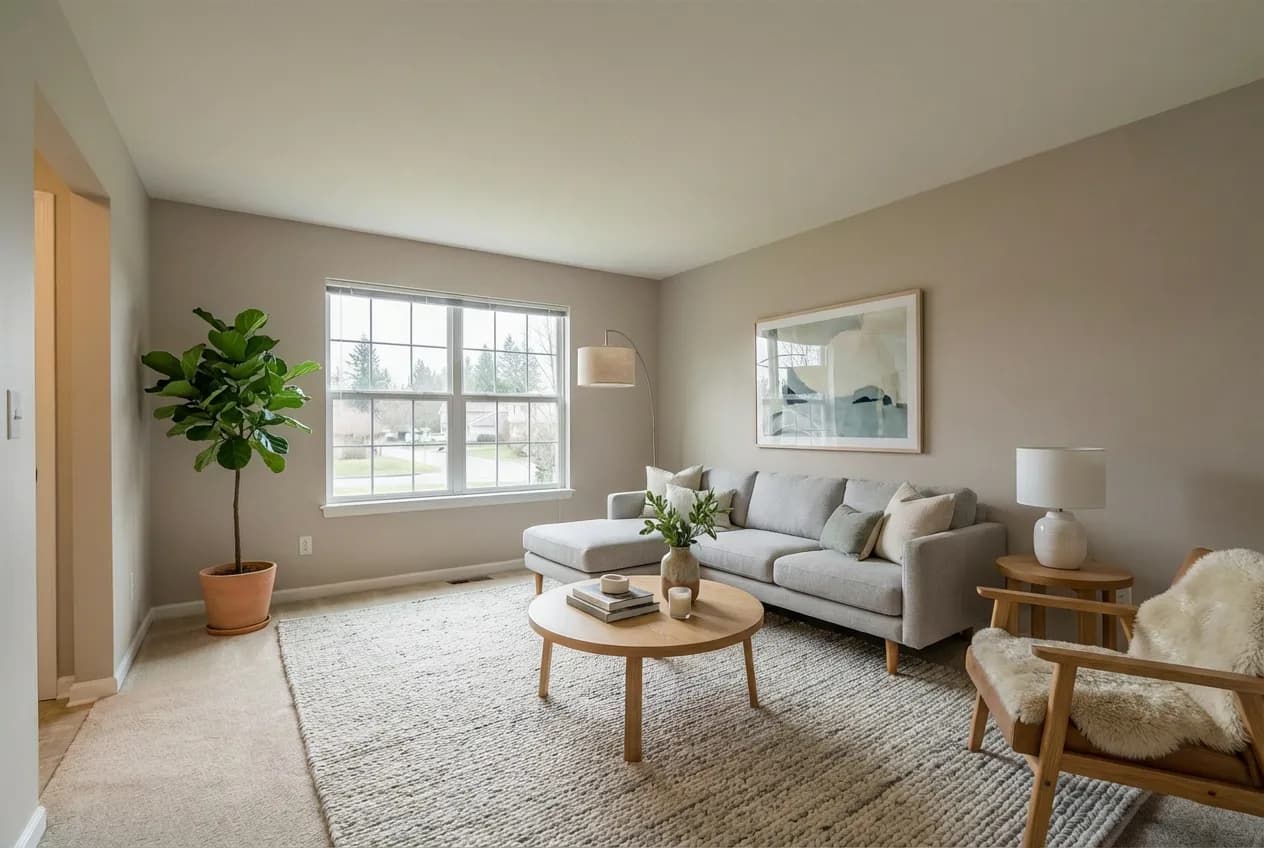
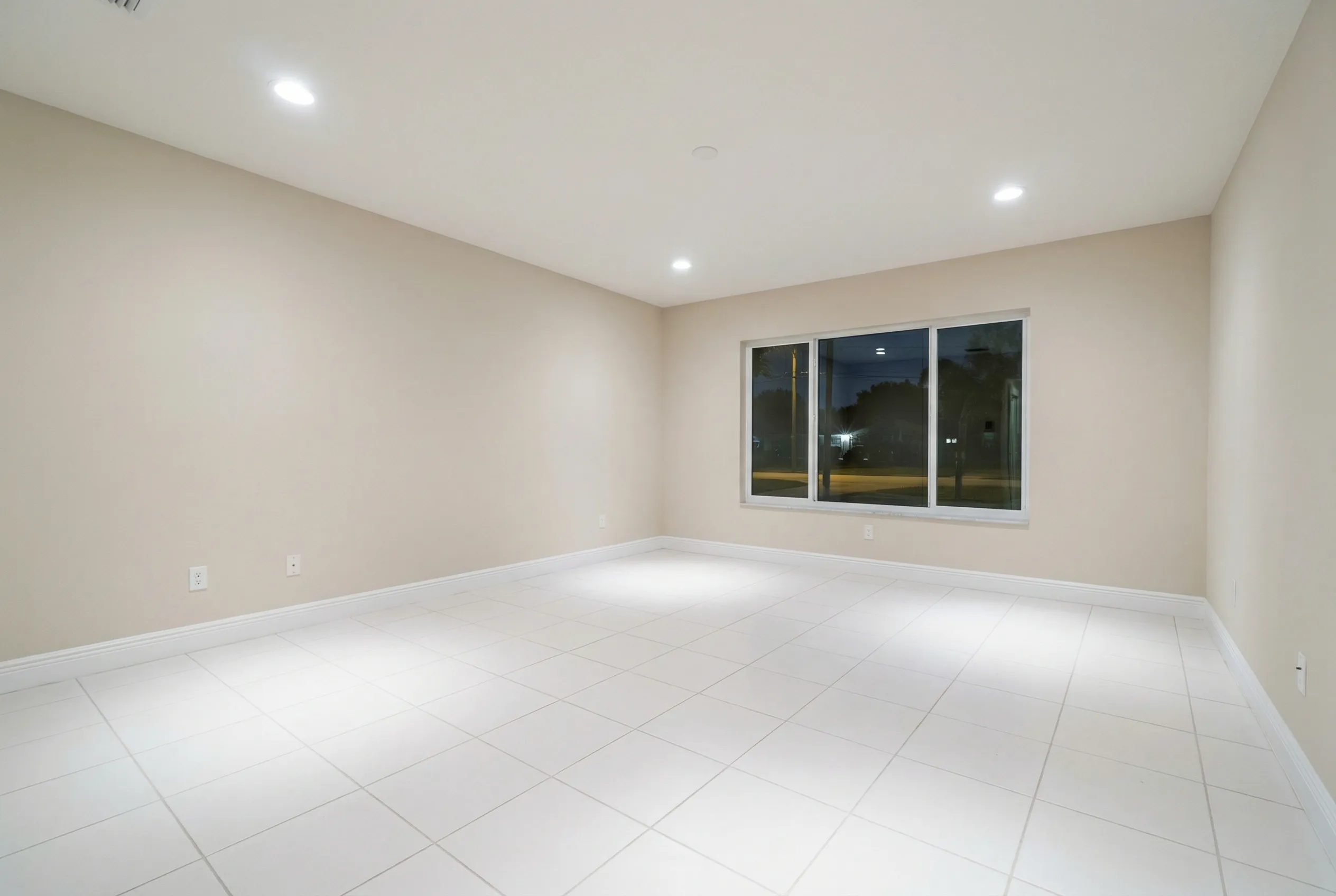
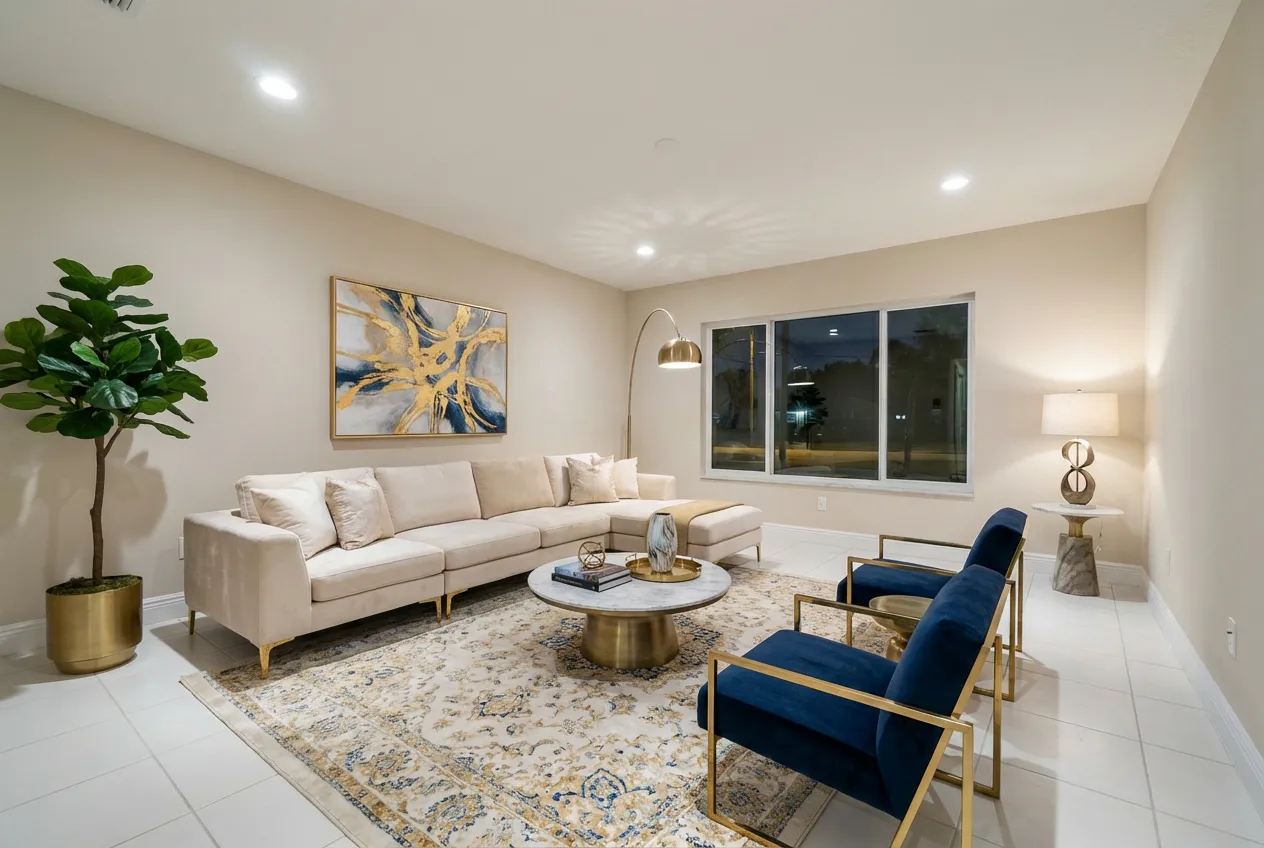
Before and after AI virtual staging
Virtual staging makes a property feel like home in a buyer's eyes, and helps sellers get better offers by showcasing space, layout, and potential in every photo.
What is virtual staging in real estate?
Virtual staging is digital home staging. You start with a photo of an empty, outdated, or cluttered room. Then furniture, lighting improvements, decor, and styling are added inside the image so the room looks finished.
The goal is not to trick buyers. The goal is to help them understand scale, layout, and use. A vacant living room often looks smaller than it really is. A staged living room gives the eye reference points. Buyers can tell where a sofa might go, whether a TV wall makes sense, and how traffic would move through the space.
That visualization gap shows up in industry research. In NAR's 2025 staging coverage, 83% of buyers' agents said staging made it easier for buyers to visualize a property as their future home, and one-third said buyers were more willing to walk through a home they saw staged online. NAR also reported in its 2025 home staging summary that nearly three in ten agents saw a 1% to 10% increase in the dollar value offered when homes were staged.
That does not mean every listing needs physical staging. Often it does not. It means presentation changes how buyers interpret a listing, especially online.
If you want the longer strategic version, this guide to virtual staging for real estate covers where it fits into a broader listing workflow.
What is virtual staging with AI?
Traditional virtual staging usually involves a human editor. You send photos, a design brief, and maybe some notes about the target buyer. The editor places furniture manually and sends back one or more final images.
AI virtual staging changes the workflow, not the core goal. The end product is still a staged image. The difference is speed, cost, and iteration.
With AI virtual staging, software can analyze the room photo, detect the structure of the space, and generate furnished versions in minutes. In many tools, you can test different styles, swap room types, or declutter first and stage second.
| Approach | Turnaround | Cost profile | Best fit |
|---|---|---|---|
| Physical staging | Days to weeks | Highest | Luxury listings and homes where the in-person showing matters as much as the photos |
| Manual virtual staging | Usually 24-48 hours | Mid-range, often per image | Listings that need art-directed control without full physical staging |
| AI virtual staging | Minutes | Lowest per image | Vacant listings, high photo volume, and fast marketing turnarounds |
That makes AI virtual staging especially useful when:
- you need listing photos live the same day
- you want to test more than one style without paying for multiple manual revisions
- the room is empty and the listing needs help fast
- you are staging photos at scale for multiple properties
It also makes virtual home staging more accessible to homeowners and photographers, not just brokerages with bigger marketing budgets.
The catch is that AI is not magic. Bad input photos still lead to weaker results. Tight angles, blown-out windows, poor lighting, or heavy perspective distortion make any staging workflow harder. AI also needs human judgment. Someone still has to decide whether the result looks realistic, matches the home, and fits the audience.
My view is simpler: AI does not replace taste. It speeds up the production work around it.
Here is an AI-staged result that does not work well and can hurt buyer trust. The issue is not that AI was used. The issue is that the output does not look believable enough to publish:
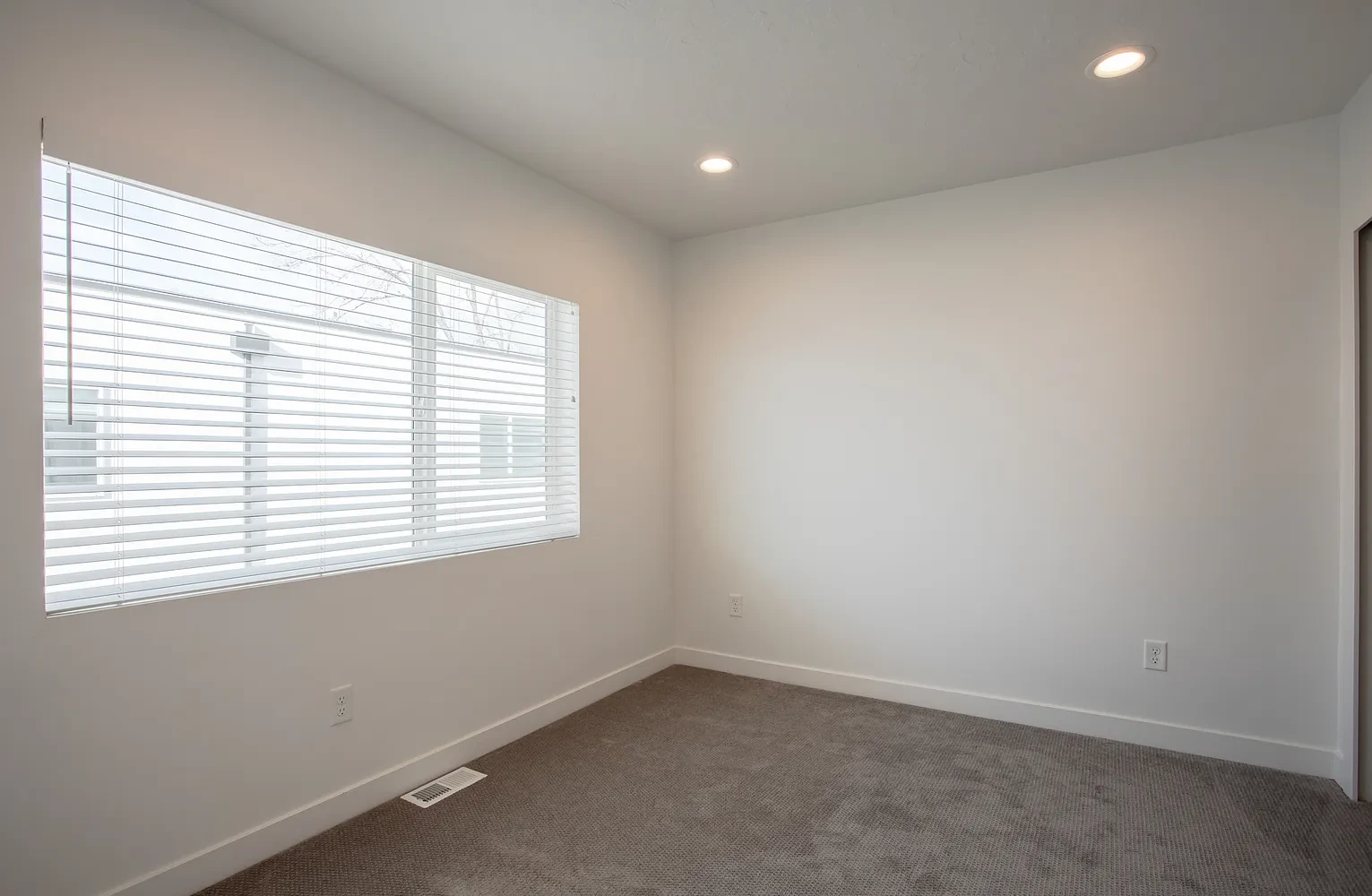
Input image for virtual staging
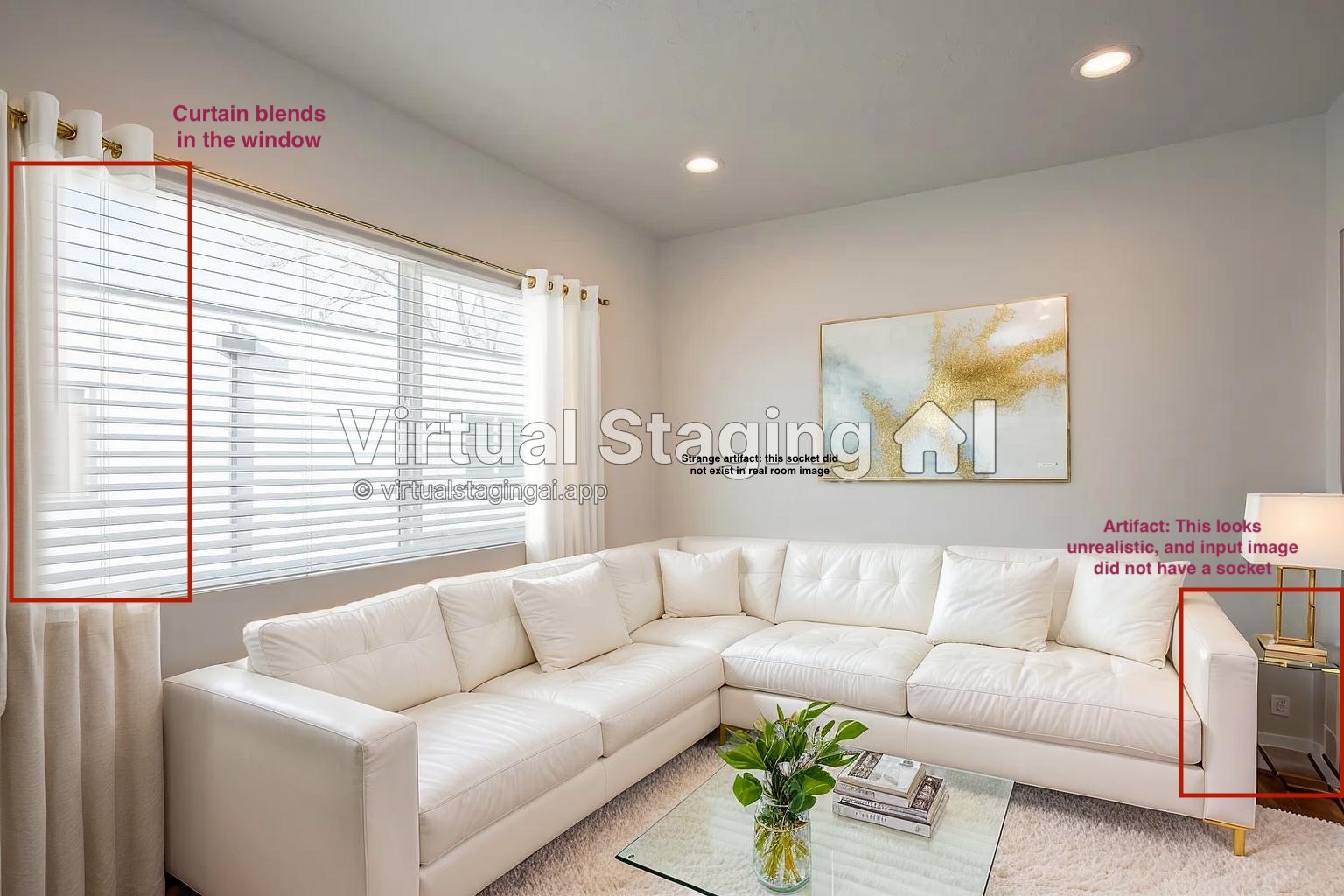
Example of an AI-staged result that does not look believable
Compare that with the step by step example further down, where the staging looks much more natural.
What is virtual staging best used for?
Virtual staging works best when the listing problem is visual, not structural.
If a property is vacant, virtual staging helps immediately. Empty rooms often feel cold in photos. Buyers have trouble reading size. Agents know the room works. Buyers do not. Staging closes that gap.
If a property is occupied but visually noisy, AI can help there too. A room packed with mismatched furniture, bright personal decor, or obvious clutter can distract from the actual shape of the space. A cleaner, staged image can show the room more clearly.
HomeLight's comparison of virtual staging vs. traditional staging makes the cost case clearly: virtual staging removes the logistics and large expense of physically moving furniture into the home, which is a big reason agents use it so often for online marketing.
In practice, virtual staging usually makes the most sense for:
- vacant listings
- budget-sensitive sellers
- rental units that need faster marketing photos
- photographers handling multiple shoots each week
- listings where online click-through matters more than in-person furniture experience
It is less effective when the in-person showing needs to match the exact emotional effect of the photos. That is the main tradeoff. Physical staging changes the house itself. Virtual staging changes the marketing.
If you are weighing that tradeoff, this piece on the pros and cons of virtual staging with AI is a useful next read.
How does virtual staging work?
The workflow is straightforward.
1. Start with a clean source photo
You need a sharp image with a wide enough angle to show the room clearly. Natural light helps. Straight vertical lines help more than people think. If the original photo feels cramped or distorted, the staged result usually will too.
2. Decide what the room should communicate
This is where many people go wrong. They ask for a "nice" room instead of asking what the image needs to do.
A downtown condo living room may need a modern, space-efficient layout. A suburban family home may need a warmer, more practical setup. A luxury listing may need restraint, not more furniture.
3. Add furniture and styling digitally
This is the actual staging step. A manual designer places items one by one. An AI tool generates a staged concept from the room photo and selected style.
4. Review realism before publishing
Check scale, shadows, alignment, and whether the furniture choice fits the room. If the result looks overdesigned, crowded, or physically impossible, do not publish it.
5. Disclose the edit
This part matters. NAR's recent article on digitally altered real estate photos points out that some states now require disclosure when listing images are digitally altered, including virtual staging. Even where disclosure is not spelled out the same way, NAR still ties listing marketing back to the requirement to present a true picture.
That is the standard to keep in mind. Use virtual staging to clarify a listing, not to conceal something material.
Three practical rules help:
- check your MLS and brokerage rules before uploading staged images
- keep the original photo in the listing set when possible
- do not stage around visible defects in a way that changes the truth of the room
How to do virtual staging with AI
This is the part most readers need. The process is straightforward, but the result still comes down to a few decisions.
Step 1: upload a room photo with good lighting
Start with the cleanest image you have. If you are an agent using phone photos, choose the widest usable angle and avoid shooting from a doorway with heavy distortion.
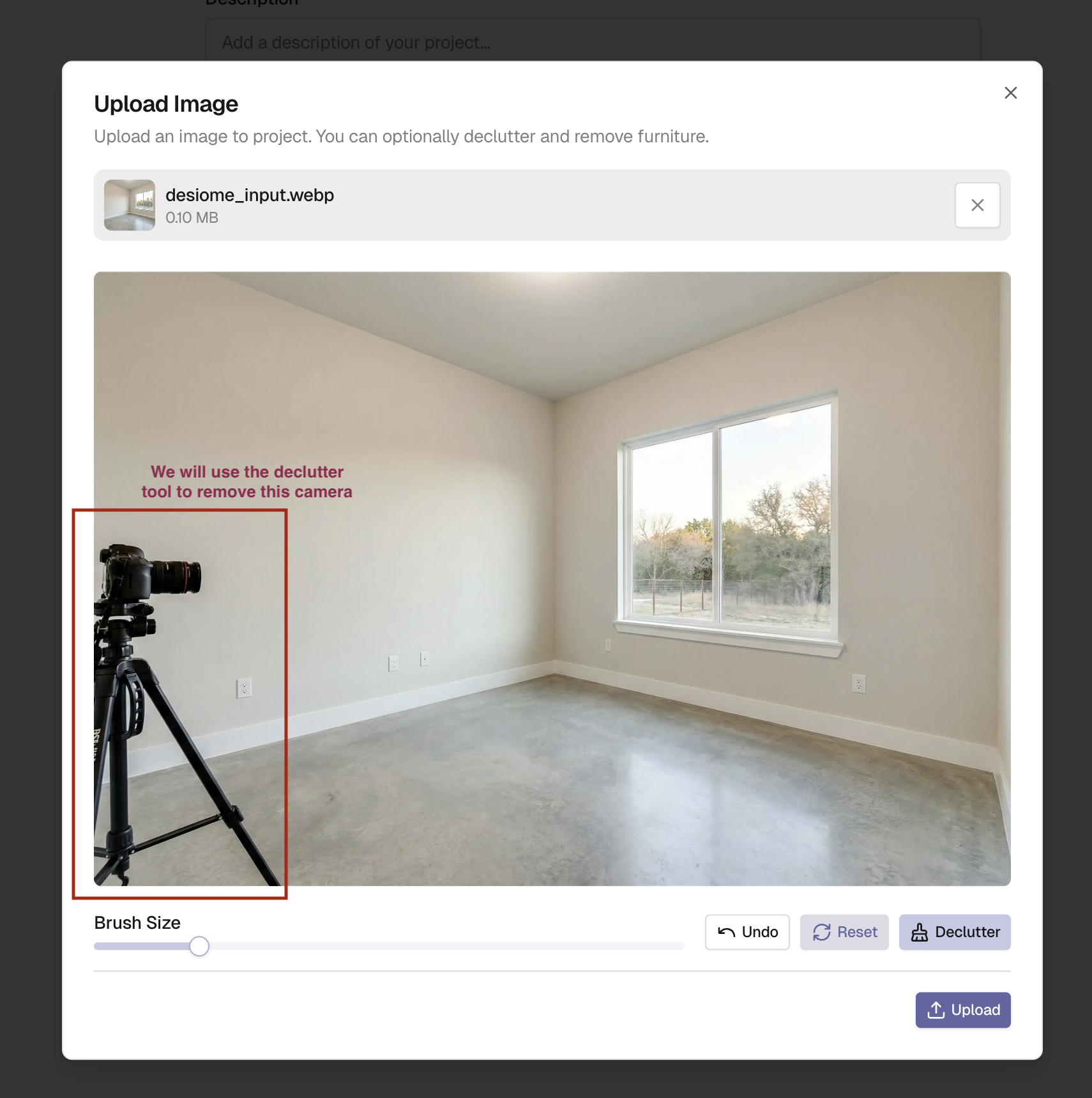
Step 2: remove clutter or existing furniture if needed
If the room is occupied, decluttering first usually gives a better final result. AI staging performs best when the model has a clean read on the floor plan, wall lines, and open floor area.
That is one reason tools like Desiome are practical for active listing work. You can clean the image first, then generate staged versions from the decluttered base instead of forcing the model to work around visual noise.
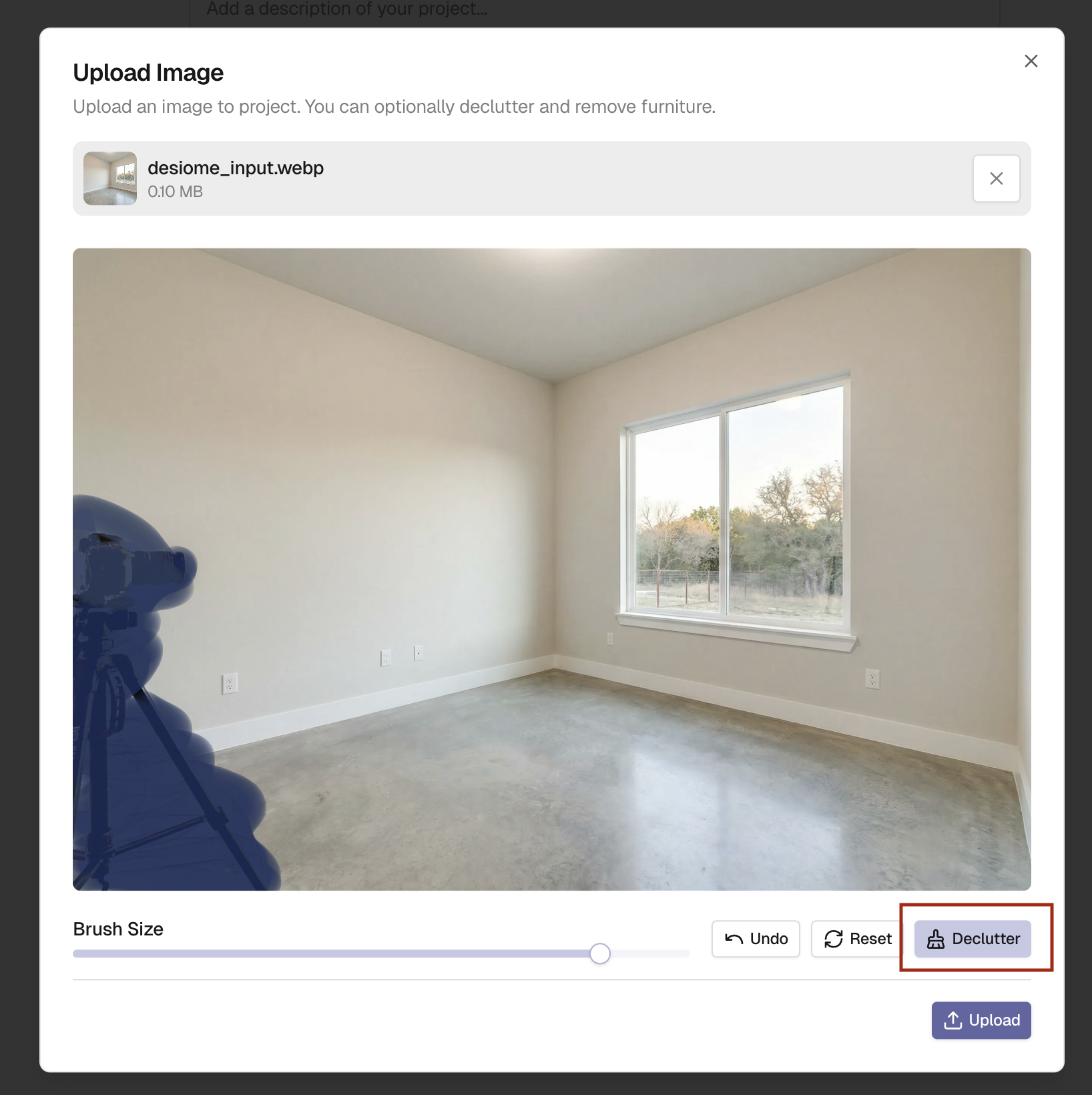
Here's how Desiome decluttered the same image:
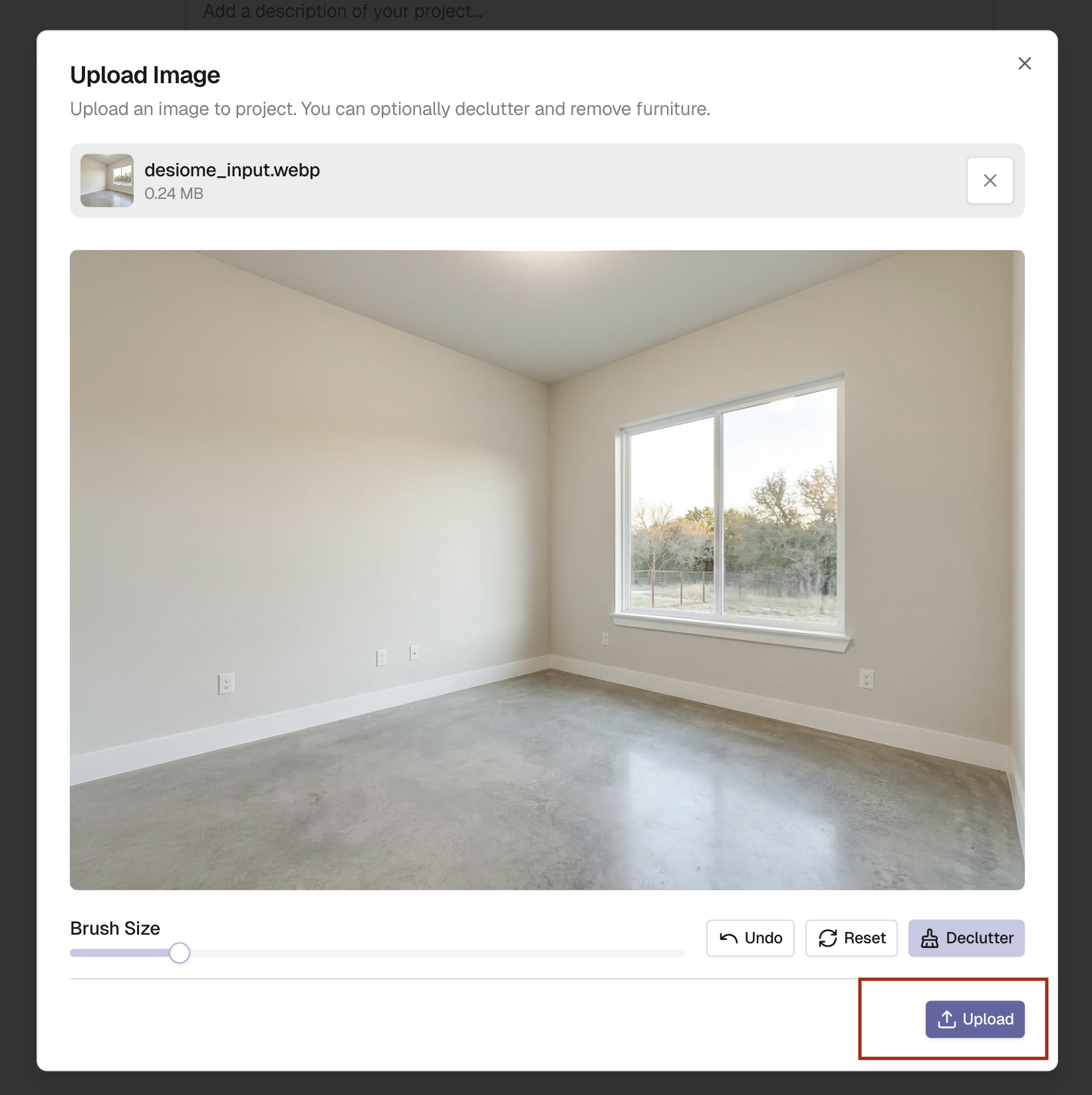
It blends cleanly with the original photo, without obvious artifacts or awkward distortions. From there, you can stage the room with a much stronger starting point.
Step 3: choose the room type and style
This is where commercial intent meets taste. The right style is not the one you like most. It is the one most likely to help the target buyer understand the home.
A good rule:
- modern works when you want clean, broad-market appeal
- Scandinavian works when you want brightness and softness
- farmhouse works when the house already supports that style
- luxury works only when the home price point can carry it
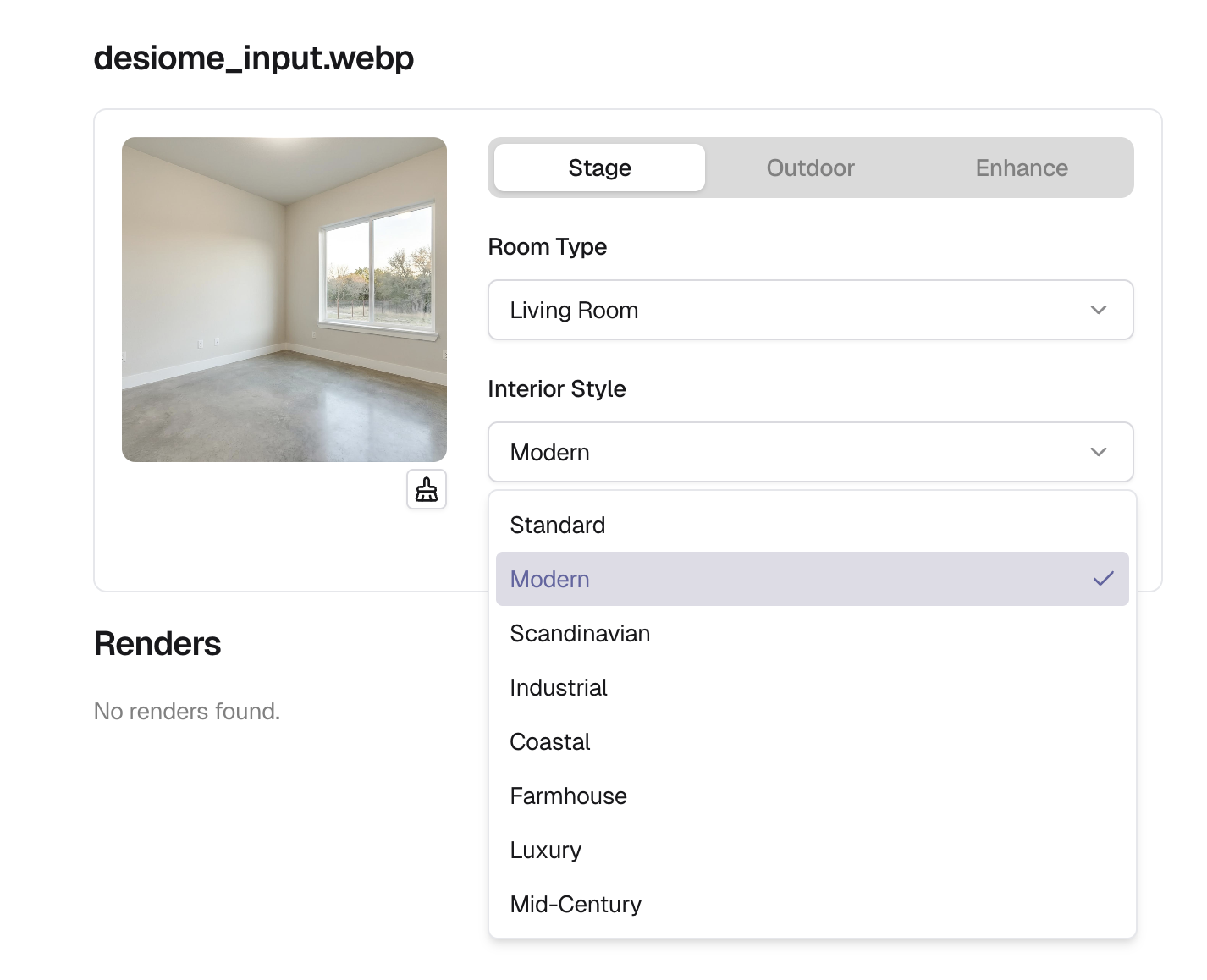
Here we decided to go with a modern style, but you can choose any style you want.
Step 4: generate more than one variation
One of the biggest advantages of AI virtual staging is iteration. You are not locked into the first result. Generate a few options. Compare them side by side. Pick the one that feels most believable.
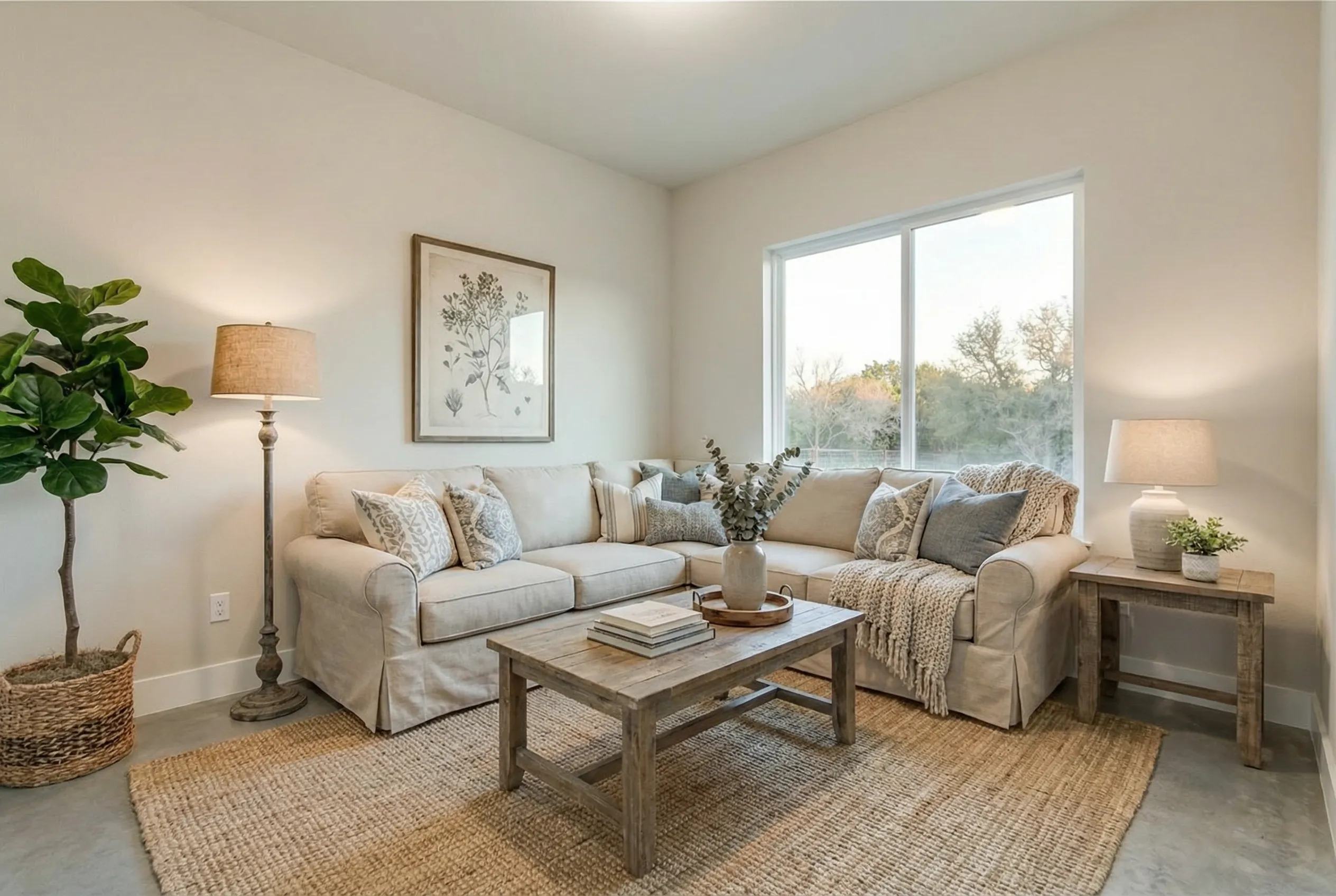
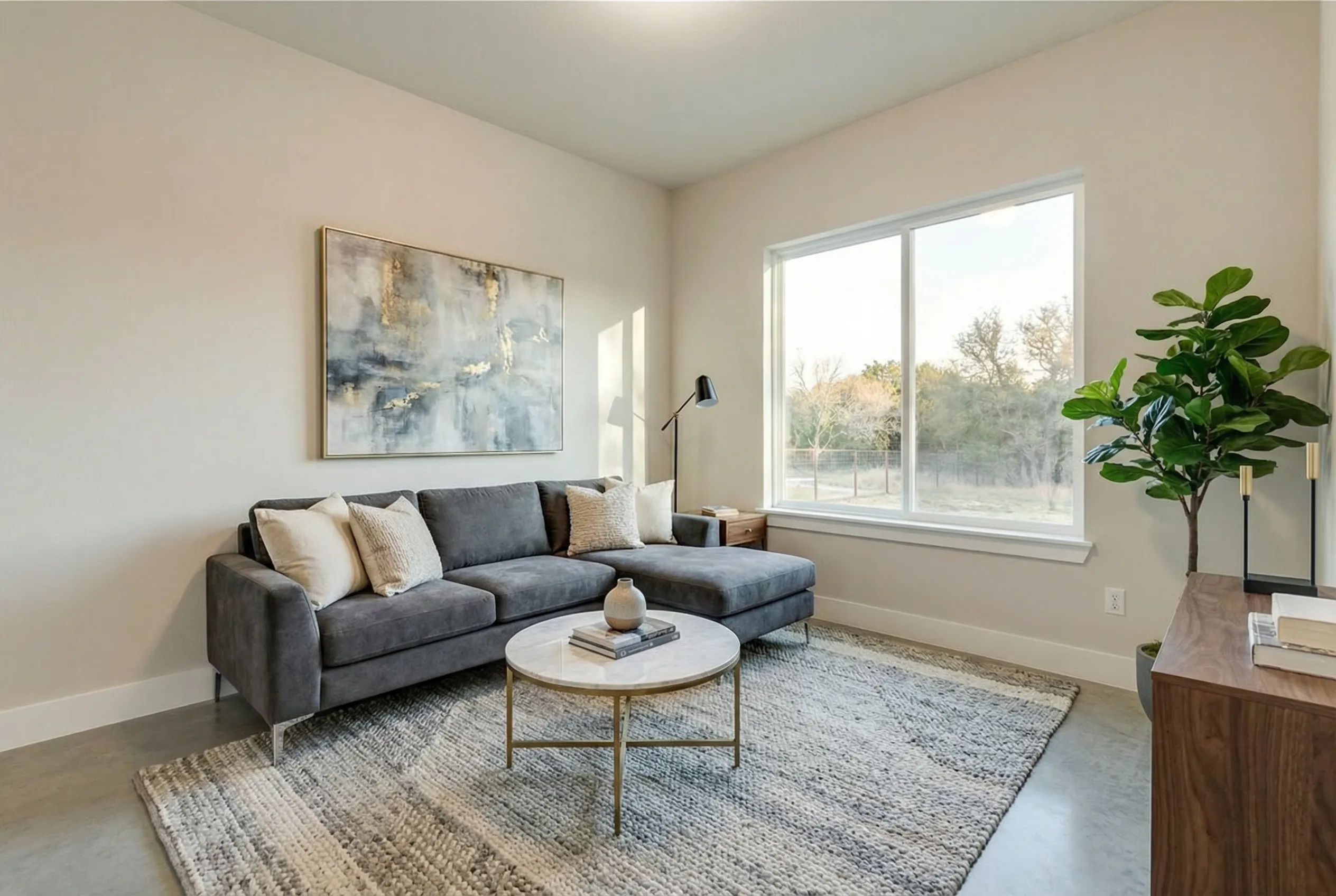
Farmhouse style (top), Modern style (bottom). Pick the one that you prefer.
Step 5: publish the final image with clear disclosure
Before uploading to the MLS or marketing site, label the image correctly if your MLS, brokerage, or local rules require it. This is also where common sense matters. If the original room has obvious damage, unusual dimensions, or missing fixtures, the staged image should not cover that up.
Step 6: keep the original photo available
This is not just a compliance habit. It also helps manage buyer expectations. Some agents publish both versions in sequence: staged first, original second. That gives the listing the visual boost while still staying transparent.
Before-and-after virtual staging AI examples matter more than explanations
Readers say they want to understand how virtual staging works. What they usually want is proof that it does not look fake.
That is why before-and-after examples are so important in this article. They show three things fast:
- whether the layout stayed believable
- whether the furniture style fits the room
- whether the image still looks like a real property photo
Including a visual sequence, from the original photo, to the decluttered version, and finally to the fully virtually staged result is important. For agents and photographers, doing so improves trust in the process.
How much should you pay for AI virtual staging?
This is where the buying question shows up. Someone may search for "what is virtual staging," then end up deciding whether it is worth paying for.
Traditional staging can cost thousands. Manual virtual staging usually costs per image and gets expensive as the photo count climbs. Our home staging cost breakdown already explains that spread well.
The practical question is not whether AI virtual staging is cheaper. It is. The better question is whether the cheaper option is still good enough to publish.
For most everyday listing work, I think the answer is yes, if:
- the source photo is good
- the furniture scale looks realistic
- the room style matches the property
- the image is disclosed properly
If you are comparing platforms, see our take on the top virtual staging software comparison is the logical internal next step. If you are specifically comparing AI-first tools against older services, this Alternatives to Box Brownie breakdown helps frame the tradeoffs.
When Desiome makes sense
The useful question here is simple: when would someone choose Desiome instead of a designer-led workflow?
Desiome makes sense when speed matters, when you want multiple variations without long revision cycles, and when you are handling listing photos often enough that manual per-image pricing starts to feel inefficient.
It also makes sense for photographers and agents who need more than one edit type. If you already know the listing photos need decluttering, lighting cleanup, or additional AI edits beyond furnishing, it is easier to keep that workflow in one place.
If you need a same-day result across multiple images, AI staging is usually the better fit. If you need one hero image for a premium listing and want heavy art direction, manual staging can still be worth paying for.
If your work is broader than staging alone, this article on AI tools for Realtors shows how AI plays a big part in real estate than just home staging.
Before and after AI virtual staging
Virtual staging makes a property feel like home in a buyer's eyes, and helps sellers get better offers by showcasing space, layout, and potential in every photo.
FAQ
Is virtual staging the same as physical staging?
No. Physical staging changes the home itself. Virtual staging changes the listing photos. The buyer still walks into the original room.
Is AI virtual staging allowed on the MLS?
Often yes, but disclosure rules vary by MLS, brokerage, and state. Check your local policy before publishing. At a minimum, the safer standard is to clearly indicate when an image has been digitally staged.
Does virtual staging work for occupied homes?
Yes, but the best results usually come when clutter or existing furniture is removed first. A crowded source image limits what any staging workflow can do well.
What rooms should you stage first?
Usually the living room, primary bedroom, and kitchen-adjacent spaces. NAR's 2025 staging reporting showed those rooms matter most to buyers.
Is virtual staging worth it for photographers?
Yes, especially if you shoot multiple properties each month. It gives you another deliverable, helps agents market vacant listings better, and makes your package more useful.
Final takeaway
At its core, virtual staging makes property photos easier to understand, easier to imagine living in, and easier to market online.
What AI adds is speed. You can go from an empty room photo to a publishable staged image in minutes, test different styles, and make better listing decisions without the cost and delay of traditional staging.
For most agents, photographers, and homeowners, that is the real value. Not hype. Not "the future of real estate." Just a practical way to make a listing look more complete before buyers ever step through the door.
Read more
You might be interested in the following articles:
Ultimate Guide to Virtual Staging for Real Estate: Expert Tips for Realtors
Discover how virtual staging and AI tools are transforming real estate marketing. Learn expert tips to showcase properties faster, cheaper, and more effectively.
Home Staging Cost: What Sellers Actually Pay and Whether It's Worth It
Home staging cost ranges from $800 to $5,000+ for physical staging, or under $50 for virtual. See the full cost breakdown by home size and decide what fits.
Top 5 Virtual Staging Software Tools in 2025
Discover the top 5 virtual staging software tools in 2025. Compare features, pros, cons, and pricing to find the right fit for your listings.